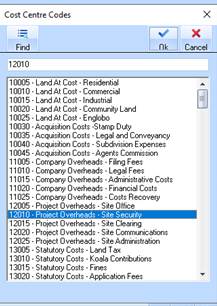
Users are able to type in the required information and press the “Find” button, which will then scroll immediately to the appropriate line.
For example, a user running the Transaction Listing may wish to only run the report for one specific cost centre – 12110. They would need to select the Transaction Listing report from the Reports Menu, then Untick the “All” button under the Cost Centre heading to load the Cost Centre Lookup window.
After typing 12110 the user would simply need to press Find (or Alt + F); the software automatically searches the list to find the first appropriate match, and highlights it. To search for more cost centres, the user simply deletes “12110” where they previously typed it, replaces it with the next number, and presses the Find button again.