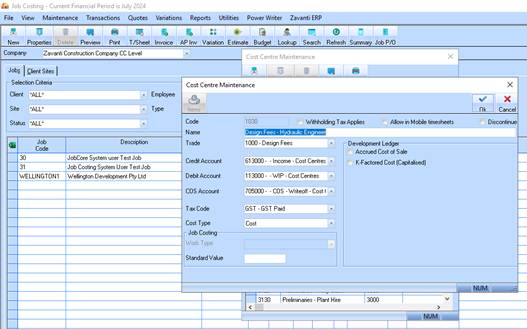
Cost Centre This is the level which will allow for Budgets and Transactions to be processed.
1. Enter a unique code and a Description for this Cost Centre
2. Select the Trade that this cost centre belongs to using the drop down selection menu
3. Select the Debit and Credit Account associated with the General Ledger – transactions are only generated to these accounts when Timesheets and disbursements are entered.
4. Please check an existing Cost Centre that your process timesheets to and using the same GL Codes.
5. Select your “Default tax Code” from the drop down menu. This is displayed as the default when invoicing.
6. Leave Cost Type at “Cost”
7. Work Type will need to be selected using the drop down menu ONLY if Job Costing is integrated to the Payroll module.
8. Click on OK to save the Cost Centre details.