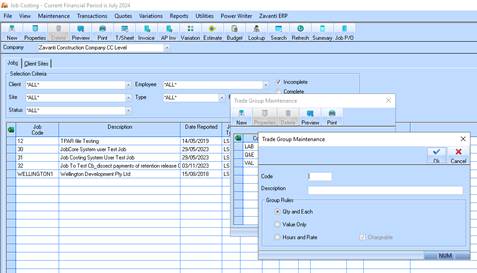
1. Enter a unique code for the Trade Group and enter a Description.
2. The Group rules are used by the Job AP invoicing process when invoicing to a Cost Centre.
3. Qty and Each will allow the user to enter a Qty and Unit Price which will populate the Total Cost on each line of the invoice (GST excl)
4. Value Only will allow the user to enter a Line Total against the cost centre.
5. Hours and Rates will allow the user to enter a number of hours and a rate which will populate the total cost on each line of the invoice (GST excl.)
6. Click on OK and the Trade Group will be saved.