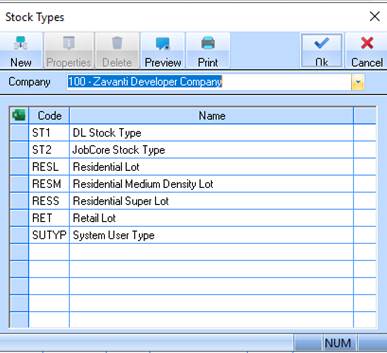
1. Select a menu path of Maintenance Ø Stock Type. The following window will be displayed:
2. Select the New button. The following window will be displayed:
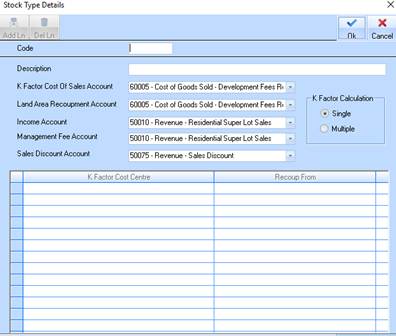
3. The Code field is used to assign the Stock Type a unique code. The code is alphanumeric, with a maximum of 5 characters. We suggest that you use a number. The code cannot be changed once created. Enter a value and press Tab.
4. The Description field is used to enter a descriptive name to identify the Stock Type. Enter a value and press Tab.
5. The
Cost of Sales Calculation radio buttons are used to indicate whether it is a
Single or Multiple Cost of Sales Calculation. Select the Multiple  radio button. The window will change in
the following way:
radio button. The window will change in
the following way:
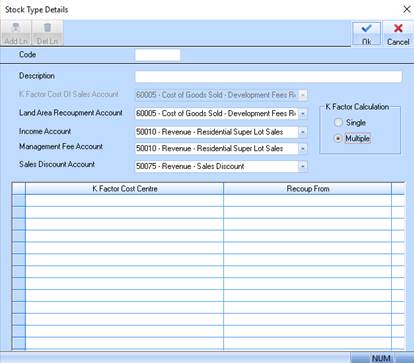
6. Enter a unique value into the Code field. Press Tab.
7. In the Description field, specify a description for the Stock Type. Press Tab.
8. Select
the Add Line button. The line will now be enabled. You may select a Cost
Centre in the Cost of Sales Distribution pick list by selecting the dropdown
 arrow. Press Tab.
9. Select
a value from the Recoup From pick list. Press Tab.
This function allows you
to build a Matrix of relationships between capital (expense) accounts and cost
of sale and recoupment accounts. When you take up a sale with the single cost of
sales rules set the system works out the percentage of the sale price using the
cost of sales percentage and then raises a cost recoupment credit in the
Development Ledger and a Debit and Credit in the GL for this value. The multi
cost of sales rules take this a step further. The process at the point of sale
works as follows:
•The matrix is scanned and the value of each Recoup from Cost Centre is worked out as a percentage of ALL expenses for the stage the lot is in. For instance if you had $500,000 of costs and you have three Recoup From Cost Centres defined such as A, B & C and these in turn had values of $250,000, $100,000 and $150,000 each would respectively represent 50%, 20% and 30% of the total expenses written to this stage.
•These percentages are applied to the Cost of Sales Value (the cost of sale value is derived by applying the cost of sale percentage to the lot price (sale price) and a cost of sale for each row is calculated. This cost is then posted to the Cost Centre selected in the Cost of Sales Distribution column.