Dynamics 365 Plugins

Dataverse provides the ability to write code that sits between the API and the data. This code, written in .NET, is referred to as a plug-in. Because the plug-in sits between the API and the data, it enforces the same logic on every app. Plug-ins can be synchronous or asynchronous, and perform the following tasks:
· Return errors to the user.
· Query Dataverse data to evaluate logic to perform.
· Perform data operations.
· Perform outbound HTTPS requests.
· Plug-ins are registered at points in the event pipeline, which are illustrated here.
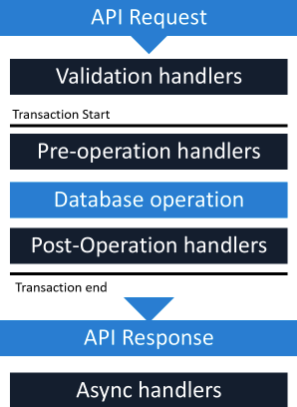
Within the event pipeline, the following events can occur:
· Requests and Responses can be examined and rejected or manipulated in several steps of the event pipeline.
· Validation handlers can throw custom exceptions to reject operations that your logic considers invalid.
· Pre-operation handlers can modify requests before the database operation.
· Post-operation handlers can modify responses.
· Async handlers perform automation after the response is returned.
One constraint with plug-ins is that they must be self-contained. If integration code requires references to other libraries, integration can be done by using Azure Functions.
Azure Functions provides a serverless code execution option for business and integration logic.
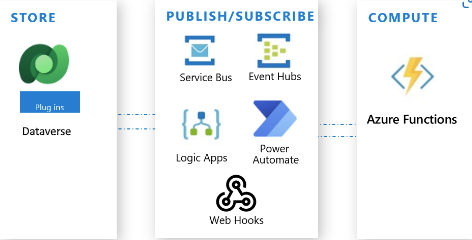
Functions are triggered by a call from an external system, service, or code such as Zavanti Property Plugin. For Dataverse, that trigger can come directly from Dataverse using Service Bus, a webhook, or a call from a plug-in. Additionally, the Azure Functions call can be initiated via a flow in either Logic Apps or Power Automate that involves the Dataverse connector.