Systems Setup Requisites
Second Step: Get the access token.

1. First, we must execute a POST web request with several information in the body in order to get a token.
· Request URL
(as POST):
https://login.windows.net/<ID_TENANT>/oauth2/token
· You can get the tenant id in the overview of the application created in the Azure portal
· Body:
· grant type = the string "client_credentials"
· ClientID = The application id. You can get in the overview of the application created in the Azure portal.
· client secret = The client secret generated in the portal azure
· resource = the URL of your CRM (https://xxxxxxx.crm6.dynamics.com/)
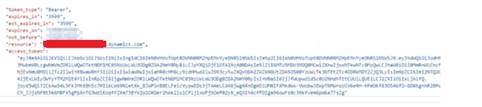
· Response
:
This request should return a Json
string containing the token:
2. Test: WhoAmI
· Then, you just have to use this token as “Bearer” in the header of any API CRM call requests.
· Let’s take an example with the WhoAmI method which is supposed to return the id of the calling user.
· Request URL
(as GET):
https://<CRM_URL>/api/data/v9.0/WhoAmI()
· Header:
Bearer Token : The access token get in the second
step 
Response :
This request should
return a Json string containing the UserId: 