Dataverse provides the ability to write code that sits between the API and the data. This code, written in .NET, is referred to as a plug-in. Because the plug-in sits between the API and the data, it enforces the same logic on every app. Plug-ins can be synchronous or asynchronous, and perform the following tasks:
•Return errors to the user.
•Query Dataverse data to evaluate logic to perform.
•Perform data operations.
•Perform outbound HTTPS requests.
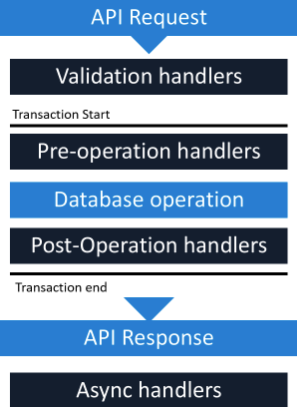
•Plug-ins are registered at points in the event pipeline, which are illustrated here.
Within the event pipeline, the following events can occur:
•Requests and Responses can be examined and rejected or manipulated in several steps of the event pipeline.
•Validation handlers can throw custom exceptions to reject operations that your logic considers invalid.
•Pre-operation handlers can modify requests before the database operation.
•Post-operation handlers can modify responses.
•Async handlers perform automation after the response is returned.
One constraint with plug-ins is that they must be self-contained. If integration code requires references to other libraries, integration can be done by using Azure Functions.
Azure Functions provides a serverless code execution option for business and integration logic.
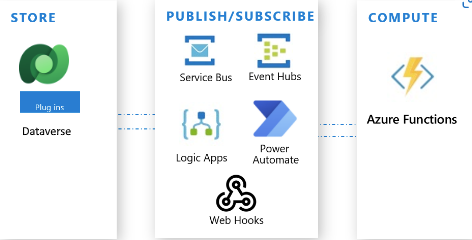
Functions are triggered by a call from an external system, service, or code such as Zavanti Property Plugin. For Dataverse, that trigger can come directly from Dataverse using Service Bus, a webhook, or a call from a plug-in. Additionally, the Azure Functions call can be initiated via a flow in either Logic Apps or Power Automate that involves the Dataverse connector.