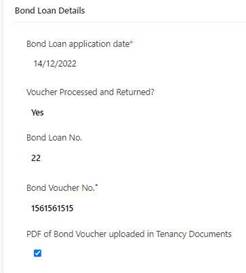
When Bond Loan Application sent to DFFH
1. Go to Tenancy page
2. Open Bond tab
3. Scroll down to Bond Loan Details
4. Enter Bond Loan Application date
5. Save
Once Bond Loan Voucher received from Housing Office
6. Forward Bond Loan Voucher to Accounts and ask if they would like you to complete the process in Zavanti. If yes, complete as below
7. Save Bond Loan Voucher to Tenancy Documents
8. Go to Tenancy page
9. Open Bond tab
10. Scroll down to Bond Loan Details
11. Select Yes from drop-down menu
12. Enter Bond Loan Number
13. Enter Bond Loan Voucher Number
14. Check that PDF of Bond Loan Voucher uploaded to Tenancy Documents
15. Save
16. Notify Accounts via Email, who will complete the process