Process:
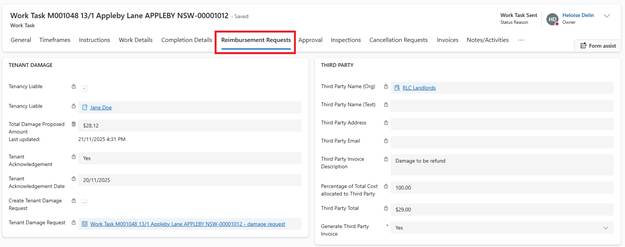
1. In Work Task, navigate to Reimbursement Requests tab
2. Go to Third Party section
4. Third Party Name:
o Select the concerned Organisation in the lookup field
o Or enter the name of the Third Party
5. Enter Email and Address
6. Write Third Party Invoice Description
7. Enter Percentage of Total Cost allocated to Third Party
8. Click Save
System Actions:
•Third Party Total is calculated
•Task created for Finance team to create Invoice in BC
Important: Third Party charges do NOT automatically interface back to Work Task. Finance team manages recovery separately through customer invoicing in BC.