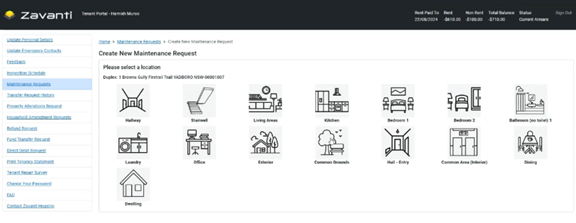
Tenants can submit Maintenance Requests through the portal at any time.
Process:
1. Select ‘Maintenance Requests’ from the left menu
2. Click ‘New’ to create a Maintenance Request
3. Select Location: Choose the area of the Property where the issue is located (e.g., Kitchen, Bedroom 1, Bathroom, Exterior, Common Grounds)
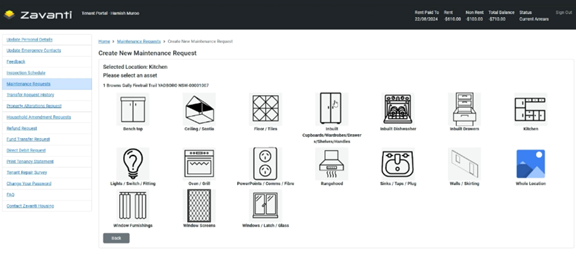
4. Select Asset: Choose the specific component or fixture requiring attention (e.g., Oven/Grill, Sinks/Taps/Plug, Lights/Switch/Fitting)
5. Select Information Codes: Choose from predefined issue descriptions that match the problem (e.g., ‘Switch sparks or trips power,’ ‘All power outlets not working’)
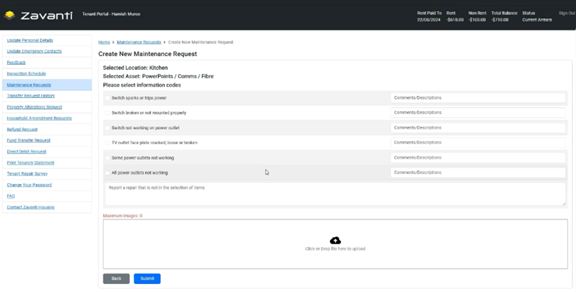
6. Add Comments: Provide additional details in the free-text description field
7. Upload Photos (Optional): Attach relevant images to help illustrate the issue
8. Click ‘Submit’
In Zavanti:
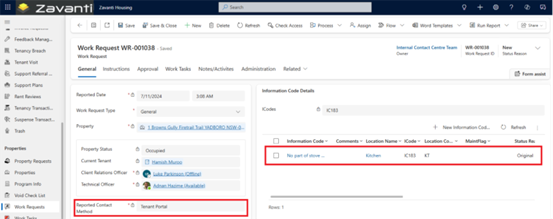
•Submitting a Maintenance Request does not automatically send a work order to a contractor: CHP will review and triage each Request to validate it meets Maintenance criteria
•Once approved, staff will create a Work Task and assign it to an appropriate contractor
•The Tenant can track the progress by checking the Work Tasks section
Information Code Configuration: The predefined issue descriptions are based on ICC (Information Code Categories) configured in Zavanti Housing.