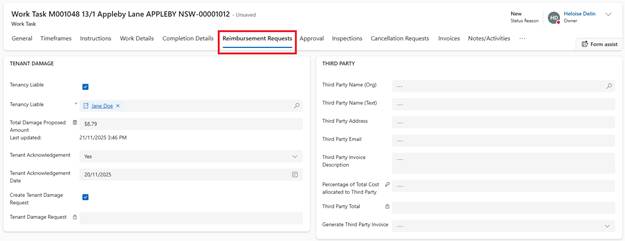
1. In Work Task, navigate to Reimbursement Requests tab
2. Go to Tenant Damage section
2. Tenant Liable:
o If current Tenant: Select Tenant from dropdown
o If former Tenant: System shows former Tenants in lookup
3. Tenant Acknowledged: Select Yes or No
o If Yes: Enter Date of Acknowledgement
4. Tenant Damage Type: Select from dropdown (e.g., ‘Repairs and Maintenance’)
5. Click Create Tenant Damage Request
6. Save
System Actions:
•Tenant Damage Request record created
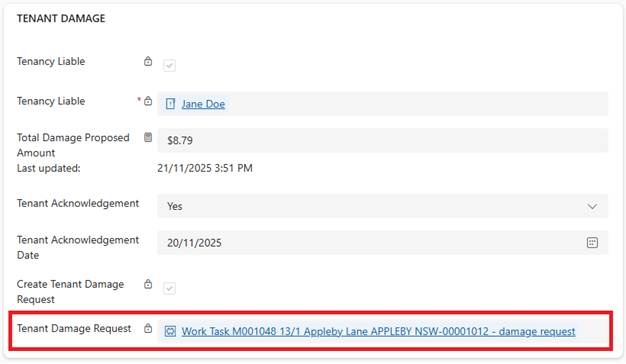
•Task assigned to Housing Officer for review and approval
•Request status: Pending
Tenant Damage Approval Process
Housing Officer Reviews:
1. Housing Officer receives Task notification
2. Opens Tenant Damage Request from task
3. Reviews:
o Work Task Details (via link)
o Damage amount justification
o Tenant circumstances
o Evidence (photos in Work Task documents)
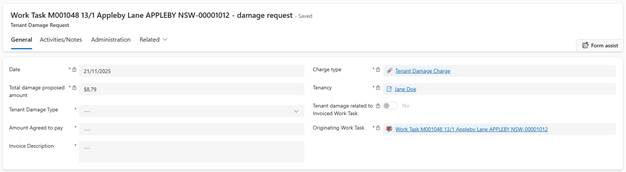
4. Discusses with Assets Officer if clarification needed
5. Send for Approval
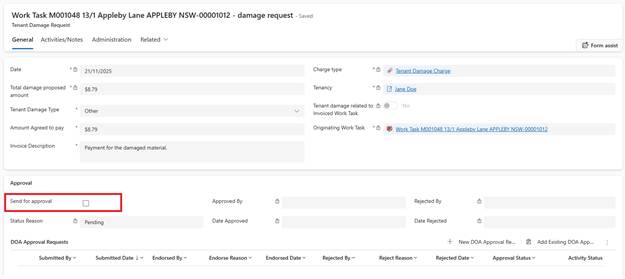
6. Approves or rejects Request
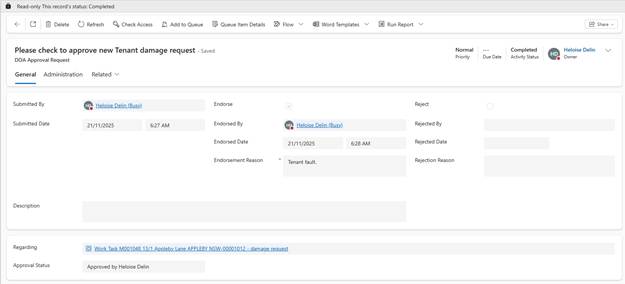
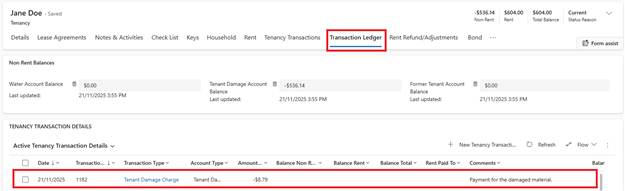
If Approved:
•It creates a Tenancy Transaction for Tenant Damage
•Housing officer can download the Tenant invoice report and send it to the Tenant
If Rejected:
•Tenant damage Request marked as rejected
•Full cost remains with repairs and Maintenance budget
•Reason for rejection noted