The Feedback function enables the Tenant to communicate with CHP about various matters.
Process:
1. Select ‘Feedback’ from the left menu
2. Click ‘New’ to create a Feedback entry
3. Complete the mandatory fields (marked with asterisks):
•Reporter name (auto-populated)
•Date and time (auto-populated)
•Feedback Type: Select from dropdown options (Request / Comment / Complaint / Compliment / Question / Suggestion)
4. Based on the selection, additional fields may appear with relevant options
5. Enter detailed comments in the description field
6. Click ‘Submit’
In Zavanti:
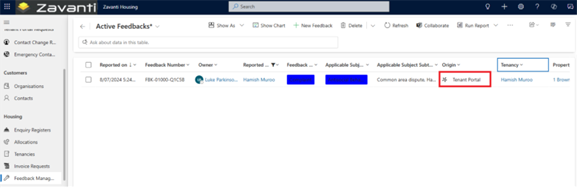
•The Feedback is recorded in Zavanti Housing with the origin marked as ‘Tenant Portal’
•The system automatically assigns the Feedback to the housing officer
•Workflows trigger Email notifications and task creation for staff members
•Staff can view the complete Tenancy history alongside the Feedback
•If submitting a complaint about a specific staff member, the system ensures that person's supervisor receives the notification instead
Conversion to Cases: CHP can convert Feedback into formal Cases for Breach management or other processes as required.