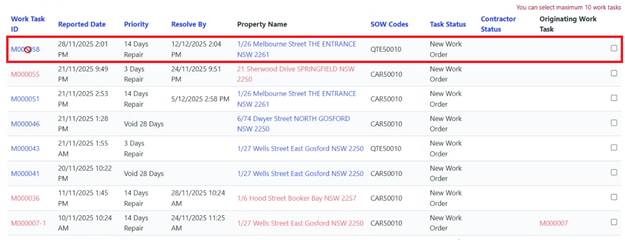
For Quote Requests, CHP uses a specific SOW code (QT50010 or customized name).
Identifying Quote Requests:
When Contractor receives a Work Task for Quotation:
•SOW code begins with ‘QT’
•Quantity indicates number of Quotes required (e.g., ‘2’ means two separate Quotes)
•Description explains what needs quoting
•Comments provide additional details
Process:
1. Open the Work Task
2. Review Work Details carefully
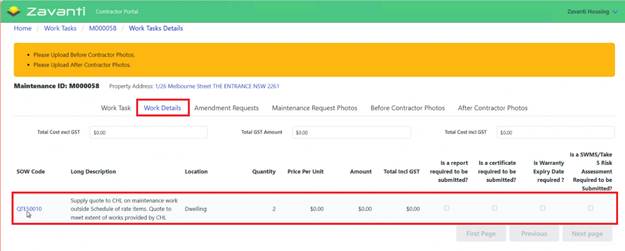
3. Note quantity of Quotes needed
4. Prepare Quotations and save each Quote as separate PDF
5. Upload first Quotation PDF
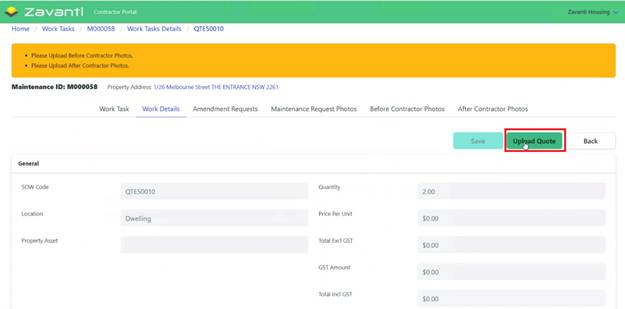
6. Add comments if needed
7. Upload additional Quotations as required
8. Confirm all uploads successful
9. CHP Review
•CHP receives notification of submitted Quotes
•Review team assesses Quotations
•One Quote approved, others rejected
10. Approved Quote Becomes Work Task
If the Quote is approved:
•Original Quote Request Work Task closed (no Invoice required)
•New Work Task created with corresponding SOW code
•Approved Quotation attached to new Work Task
•New Work Task sent to Contractor to complete the work
•Contractor proceeds with work as per approved Quote