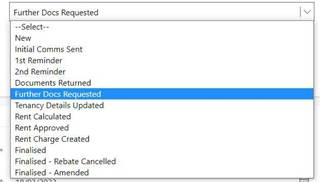
1. Check Rent Review Statuses for your Properties daily
a. Select Rent Reviews from the menu panel
b. Filter Owner by your name
c. Filter Rent Review Status by ‘Documents Returned’
2. For each Tenancy at ‘Documents Returned’ status review documents saved to Zavanti and confirm that all required documents have been received
If not, all Documents have all been provided:
3. Update Status to Further Docs Requested
4. Enter Further Docs Requested Date
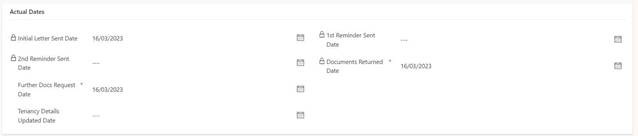
5. Scroll Down page to ‘Further Docs Request Comments’
6. List Further Documents required, separating each with a comma or period

NB. These details must be clear and professional, as they will appear in the letter that will be sent to the resident
7. Save
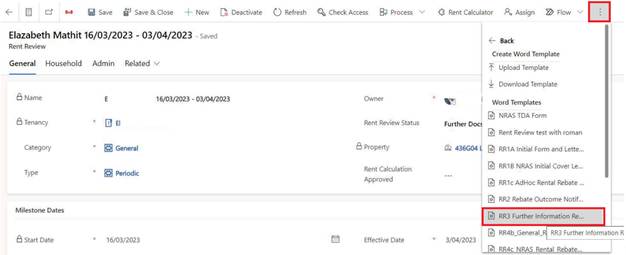
8. Open the Additional Commands menu
9. Select Word Merge
10. Select RR3 Further Information Required Letter
11. Ensure details on letter correct
12. Save to Rent Review Documents tab (from Related drop-down menu)
13. Send either manually
NB. Once status changed to Further Docs Requested, Follow Up Process will no longer be automated. Reminder letters will not be automatically sent. Rebate will not be automatically cancelled if not completed by Complete Assessment Date. Next Automation step will occur after status changed to Rent Approved.
Once all Documents have all been provided:
14. Update Tenancy Details by:
a. Update Household Composition as Necessary
b. Update Income for all Contacts on the Household
c. Update Commonwealth Rent Assistance for All Contacts on the Household
d. Update Contact Details as Necessary
e. Update Consent as Necessary
15. Update Status to Tenancy Details Updated
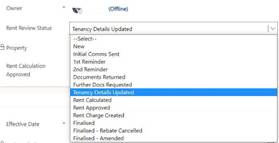
16. Enter Tenancy Details Updated Date
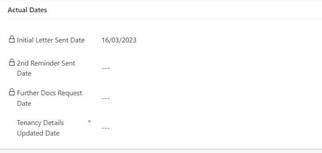
17. Save
18. Status will automatically update to Rent Calculated
19. Wait for Coordinator Approval
20. Once Approved by Coordinator, New Rent Rebate letter will be sent to Resident automatically
If Documents are not returned at all, or status is not updated by CHP Staff into Zavanti before Complete Assessment Date:
21. Rent will automatically be calculated at 74.99% of Market Rent and a Rebate Cancelled Letter will be sent to Resident
If Resident Provides all Documents AFTER Complete Assessment Date and BEFORE Effective Date:
22. Save all documents to Renter’s Zavanti File (Documents tab → Rent Calculations →Rent Review →YEAR)
23. Amend the Rent Review

A new Rent Review (Ad-Hoc CHP) will be created, status will update to Documents Returned
24. Follow steps 14-18 as above
25. Notify Coordinator that Approval required