1. Select Tenancies from menu panel
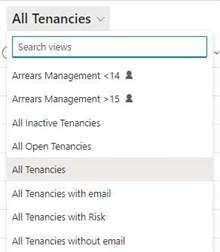
2. Select All Tenancies from the drop-down menu
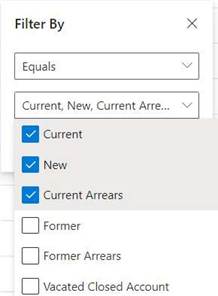
3. Filter Tenancy Status to Equals Current, New, and Current Arrears
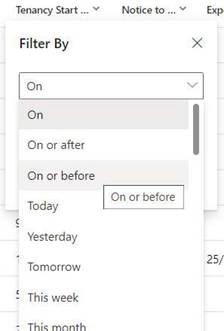
4. If a Cut-off date is being observed, filter Tenancy Start Date to On or Before [Cut-off Date]
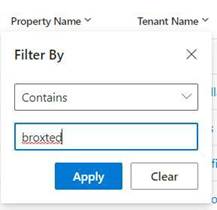
5. Filter Property Name to Contains [keyword of Property Parent name] to select Properties you wish to Kick Off Rent Review for
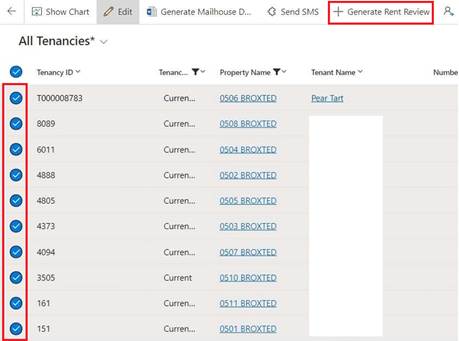
6. Select All Tenancies for that Property
7. Select Generate Rent Review
8. Select Start Date on dialogue box that appears
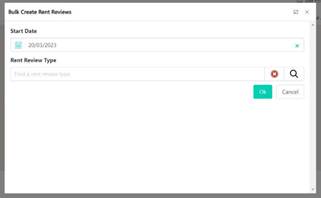
9. Under Rent Review Type, click the Search Button
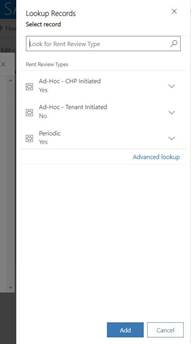
10. Click the search button in the panel that appears on RHS of the screen
11. Select Periodic Rent Review
12. Select Add
13. Click OK on dialogue box (see above) and wait while process loads
14. Repeat steps 1-13 as necessary for all Properties undergoing Periodic Rent Review
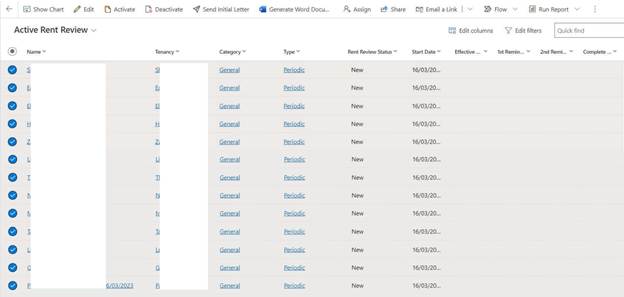
15. Select Rent Reviews from the menu panel
16. Select Send Initial Letter and wait while process loads (Note this process cannot be undone)
17. Notify Housing Team that Initial Letter has been sent
NB. Once Letter Sent, status will update to initial comms sent, and all milestone dates will update accordingly
NB. Zavanti will automatically detect NRAS Properties and send appropriate paperwork as required