Editing an Inspection
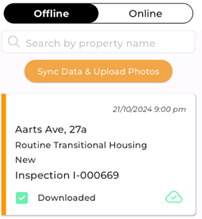
The data on this Inspection will now be available to edit even though your app has turned off connectivity for editing purposes. When you see this cloud icon it means that the data in Zavanti CRM and local (offline data) are matching.
When you update Inspection data, the cloud icon will change to a red cloud with a cross, indicating that the information stored on your device no longer matches what is in Zavanti Housing. This means the Inspection needs to be synced so the latest updates can be uploaded to Zavanti.
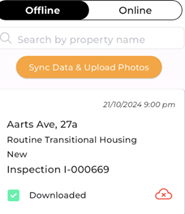
Do not sync using mobile data. Once you have a stable internet connection, tap ‘Sync Data and Upload Photos’ or pull down to refresh. A message will appear confirming that the app is syncing your data and photos. When the process is complete, the green cloud icon will reappear, indicating that the data on your device and in Zavanti Housing are now aligned.
Important: If you attempt to sync while your connection is weak, an error message may appear. Wait for the message to clear and try again once you are on a stable connection. Do not delete the app, as this may cause unsynced data or photos to be permanently lost.