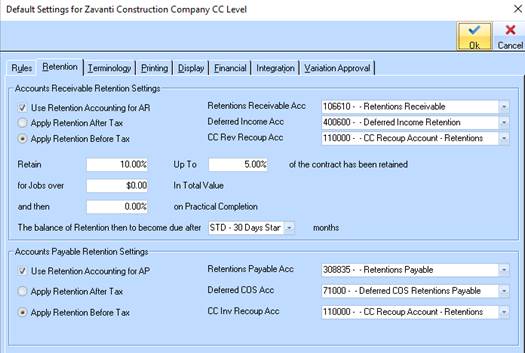
Use Retention Accounting for Accounts Receivable – applicable for Job Costing related client claims. When enabled (ticked), one of the following options need to be selected:
1. Apply Retention Before Tax – when retention should come off claim before applying tax ... OR
2. Apply Retention After Tax – when retention should come off claim after applying tax
Dependent on which option is chosen above, the following General Ledger accounts need to be nominated as follows:
3. For Retention Before Tax – Deferred Income Account – this account is in line with ATO requirements that state that as no tax has been paid (as yet) on the retentions, then the value of the retention should not be recognised as revenues as yet. When retention is released (paid) and the tax is applied on the release invoice, it will then be transferred from this Deferment account to the job type revenues account. Note – this account is ONLY used when selecting Apply Retention Before tax.
4. For Retention After Tax – Retentions Receivable Account – this account is the Asset account (normally) that is to be used to hold the retentions that are claimable at the end of the liability period. This account applies to BOTH before and after tax retentions scenarios.
Retention Default Percentages
5. These percentages are set by user and applied as the retention rule values for each job created for this company. Any job that differs from these rules should be adjusted accordingly on the job itself, in the job properties -> rules window. These settings are held in the Job Costing/Defaults/Retention Tab.