When creating a Stage or Lot you can flag a stage as an Alpha Stage if you do not yet know the numeric codes issued with Title. This function allows you to change all of the lots within an alpha stage to numeric lots (when you have been assigned the lot codes from the statutory body) and at the same time mark the stage as a Numeric stage. As well as the primary lot information being changed to the new numbering, all the associated transactions will be moved to the new coding. This will include sales, costs, prices, cost of sales accruals etc.
1. Select a menu path of Transactions Ø Allocate Numeric Lot Details.
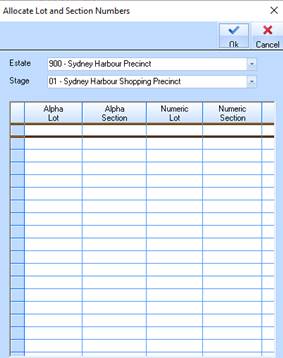
2. The following window will be displayed:
3.
Select a value from the Estate pick list by selecting the dropdown arrow .
Press the Tab key.
.
Press the Tab key.
4.
Select a value from the Stage pick list by selecting the dropdown arrow .
All entries will be displayed.
5. Select a line item and position your cursor in the Numeric Lot field. Enter a numeric value and press the Tab key.
6. In the Numeric Section field enter a value and press the OK button. The system will update the Lot record with the updated Section and Lot numbers.