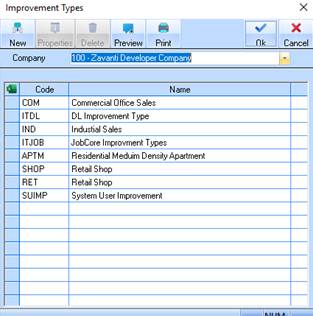
Improvement Types may be used to define different types of construction developments i.e. a townhouse within a townhouse project, or differing sizes of houses, e.g. small, large, display homes, etc. They are also used for subtotalling improvements and as selection criteria on the improvement listing.
Improvement types also form an essential part of your integration with the General Ledger (via Cost Centres). For instance in your General Ledger and Development Ledger reporting you may want to see profit and trading reports by different types of improvement, and you will certainly want to see these figures by the type of improvement usage, for instance Town Houses as opposed to Houses or Commercial Buildings. The improvement types give you the ability to define this integration.
If you have decided to use Multi Cost Recoupment style for an estate it is here in the improvement type maintenance that you will set up your matrix of capital accounts to cost of sales (recoupment) accounts.
If you wish to run Improvement Reports for multiple companies, you will need to create identical Improvement Types in all companies.
These codes are allocated to your Improvements and assist you in the same way as the Stock Types do except that they are dealing with improvements instead of land.
1. Select a menu path of Maintenance Ø Stock Ø Improvement Type. The following window will be displayed:
2. To create a new improvement type, select the New button. The following window will be displayed:
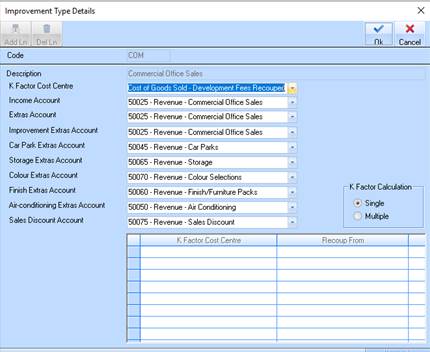
3. Enter a value into the Code field and press Tab.
4. Enter a value into the Description field and press Tab.
5.
The General Ledger (GL) Account pick lists will default for you. Should you wish
to change the defaults, select the dropdown arrow  and select a
different value?
and select a
different value?
6. Press the OK button.