It may be necessary to create a selected employee SAFF file if certain employee super details were incorrect, incomplete, or failed to upload in a previous submission. This allows you to correct and resubmit only the affected records, ensuring that contributions are accurately reported and paid without needing to regenerate the entire pay run file.
By targeting just the impacted employees, you can maintain compliance, reduce errors, and avoid duplication in the clearing house.
To do so in Zavanti,
1. Log in to Zavanti Payroll
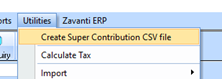
2. Navigate to → Utilities > Create Super Contributions CSV File
3. You will be presented with a window to enable you to select the required Pay run and Employee required to generate a specific SAFF Contributions file from a specific Pay Run
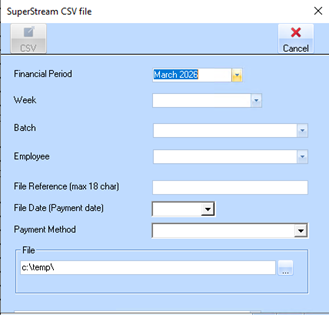
4. Use the selection options to navigate and select the required Employee Pay Run
•Financial Period
•Pay Week
•Pay Run Batch
•Employee
5. Enter the enter the SAFF file parameters and required file name as shown. Refer to previous section on details to enter
6. CSV Generation
•After entering all parameters and details, click the CSV button to generate the file.
•Based on the selected Pay Run data and Employee combination, the SAFF CSV file containing superannuation contribution details is created.