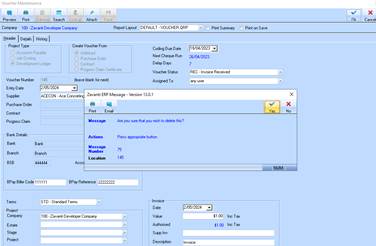
If a Voucher has been entered erroneously or is no longer required, this function allows a user to delete the Voucher from the system.
To delete a Voucher
1. Select the line item of the Voucher from the data table and press the Delete button.
2. The user is not allowed to DELETE an APPROVED Voucher. If user clicks the ‘DELETE’ option and the Voucher is approved then a message will be displayed “This Voucher has been Approved. You are not allowed to delete”
3. The following message will be displayed:
4. Select the Yes button. The refreshed main window will be displayed.