
Workflow is a tool within the Zavanti ERP suite of products that allows you to easily amend your database tables to capture information that is not currently stored within the application. Speak to your Training Consultant for more information.
The Detail Balances tab allows you to bring balances from the database into the Details area. For example, a workflow can be brought into the Details area using this method. Normally a Workflow is not available in the Details area.
|
|
Workflow is a tool within the Zavanti ERP suite of products that allows you to easily amend your database tables to capture information that is not currently stored within the application. Speak to your Training Consultant for more information. |
1. Select the Detail Balances tab.
2. The following window will be displayed:
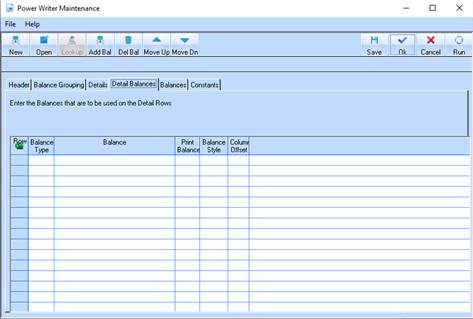
3. If there is a balance in the database, or a workflow amount that you want to use in an expression in the Details tab, you can specify it here. Then you can use this in a formula in the details tab. For example, if you have a KPI percentage stored as a workflow in your database, you can enter it in the Detail Balances tab, and refer to it in the Details tab.
|
|
If you are having difficulty understanding the difference between the Details, Detail Balances, and Balances, the following diagram may help:
|
|
|
Balances |
Balances |
Balances |
Balances |
Balances |
|
Details |
Data |
Data |
Data |
Data |
Data |
|
Details |
Data |
Data |
Data |
Data |
Data |
|
Details |
Data |
Data |
Data |
Data |
Data |
The Details tab allows you to specify the data that is in the columns of the report. The Balances allow you to specify the information that comes out for the detail rows. You cannot specify a Balance and use this in an expression in the Details tab. However, using the Detail Balances you can. You can specify any balance in the database, and then use this in the Details tab in an Expression.
