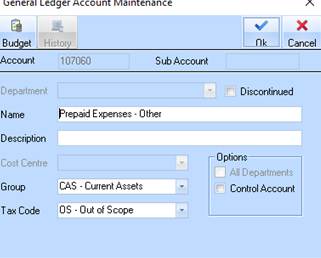
The software allows a user with appropriate security settings to 'discontinue' General Ledger Accounts across 'all' entities, in order to clean up the chart of accounts and to restrict users from posting to these non-required GL accounts.
The above GL Account maintenance function is modified to allow the user to 'discontinue' a GL Account.
A new check box 'Discontinued' is provided.
When 'checked' and the user clicks the 'OK' button to SAVE changes then the following checks is made and an error message will appear if
•The balance of the selected GL account is not ZERO.
•There are existing 'unposted' Journals for the selected account
•The GL account selected is used in any of the following default settings
o Cost Centre maintenance
o Distribution code maintenance (AP and AR)
o Payroll Defaults, Allowances, Contributions, Deductions and Work types
o Bank Account maintenance
o Tax Code maintenance
o Job Costing job types maintenance
o Job Costing retention settings
o AP and AR Account group maintenance
o Inventory location maintenance
o Inventory Group maintenance
o Fixed Asset Group maintenance
o Funding Journal Maintenance
•Where the GL account selected is the selected from the 'Parent' company as part of the SYNC setup, then the above checks must be performed on all 'Child' companies
•The database table GLHDR is modified to allow for the new field 'Discontinued'