1. Select a Funding Facility.
2. Open Draw Downs tab.
3. Click New.
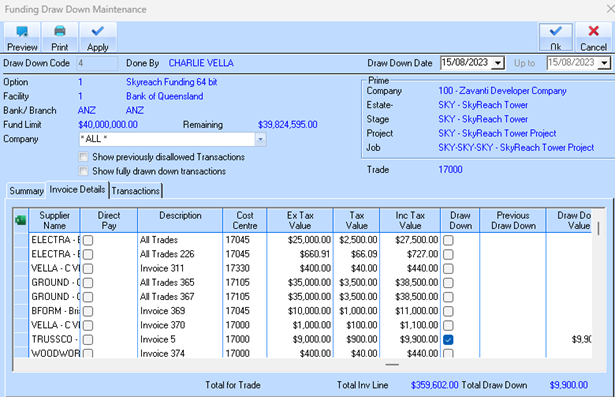
4. Enter draw down information (amount, date, notes). This screen facilitates the process by which a developer or builder draws money from a pre-approved construction loan facility as work on a project is completed. The system ensures that funds are released in stages, aligned with actual progress, which helps manage cash flow and reduces risk for both the lender (Bank of Queensland, ANZ) and the borrower (Zavanti Developer Company).
5. Project Overview: The top section provides key financial details, including the total Fund Limit ($40,000,000.00) and the Remaining balance ($39,824,595.00).
6.
|
7. Draw Down Management: The columns for Draw Down, Previous Draw Down, and Draw Down Value allow the user to select which invoices or portions of work are being claimed in the current funding request. In this specific snapshot, only one invoice for $9,900.00 is selected for the current draw down.
8. Process: By using the "Apply" button, the user can submit these selected invoices as a formal claim to the bank. The bank then typically sends a valuer to inspect the site and verify the work has been completed before releasing the funds directly to the builder or the borrower's account.
This module is a crucial tool for financial control, ensuring all costs are tracked against the project budget and funded correctly through the agreed-upon financing stages.
9. Save.