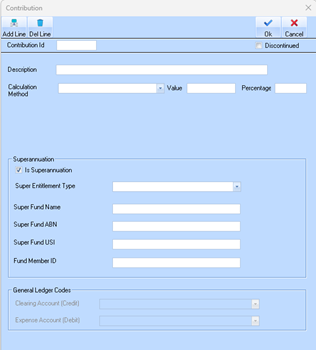
The employee’s superannuation fund details are maintained at the contribution detail level.
If you intend to use the SAFF file upload to your clearing house, you must ensure that each employee has a separate and valid superannuation contribution record(s) that includes their correct fund details.
These contribution records must be set up in accordance with Australian Taxation Office (ATO) requirements to ensure:
•Accurate year-to-date (YTD) superannuation reporting of the current 12% Super Guarantee in the STP file, and
•Correct superannuation fund details are included in the SAFF file.
1. Navigate to Maintenance > Contributions.
2. For each employee:
a. Create/Maintain a Contribution record(s) containing their superannuation details
b. Update any incorrect or missing data immediately.
|
•Super Fund Name: Legal name of the complying super fund.
•Super Fund ABN: Australian Business Number of the super fund.
•Super Fund USI: Unique Superannuation Identifier required for APRA-regulated funds to identify the specific product.
•Fund Member ID: Member Account Number of the employee’s specific account identifier.
3. Ensure the Contribution details are set correctly according to the ATO STP reporting requirements.
4. Ensure the Contribution is added to the Employee’s Standard Timesheet for Pay Run processing.
|
ℹ️ |
These details must match the records held by the super fund and comply with requirements set by the Australian Taxation Office to ensure successful SuperStream processing. If you intend to continue manually submitting employee contributions through your clearing house and not use the SAFF file option, you are not required to configure super fund details for each employee. However, it is essential that the correct ‘Super Entitlement’ type is set on your generic Super Contribution record(s) |