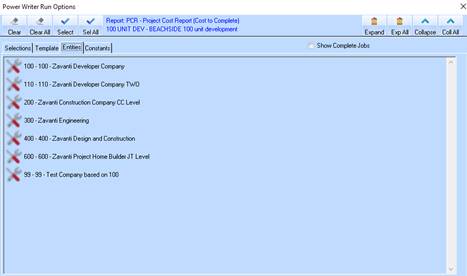
The Entities tab gives you access to the Companies, Estates, Stages and Projects in your business. You will need to choose a valid entity to run the report on.
1. From the Run Options window, select the Entities tab. The following window will be displayed:
4. Double click on the Company you would like to report on. The Tree will expand to display the child items.
5. Double click on the Estate or Job Type you would like to report on and select the entity or item you would like to run the report on.
6. Select the line item that you would like to report on by clicking on it once and press the Select button.
7. Repeat these steps for all the entities that you would like to report on. If you would like to report on all lines, press the Select All button.
8. Once completed, press the Selections tab and press the Save button. The following window will be displayed:
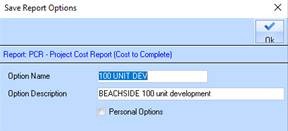
9. In the Option Name field, specify a run option name. Press Tab.
10. In the Option Description field, specify a name descriptive term for the run option. Press the OK button.
11. To generate the report, press the Process button.