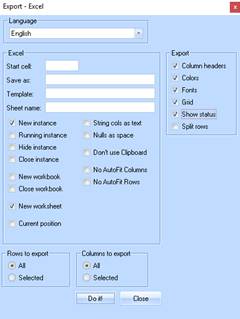
1. Using either the table-window icon , or ‘Shift-Ctrl-X’ ( give the table focus first by selecting one or more rows ) gives the following options:
|
Field |
Description |
|
Language |
Display the Export progress in selected language. For future use. |
|
Save As |
Automatically saves the excel file with the name specified. If the file already exists – Excel asks if you want to over-write. |
|
Template |
The output is formatted using the specified excel template. |
|
Sheet Name |
Gives the next created sheet the specified name. e.g. ‘Test Sheet’ |
|
Start Cell |
The exported data will start in the specified cell. E.g. ‘B3’ |
|
New Instance |
Starts a new instance of Excel for the export. |
|
Running Instance |
Uses the currently running instance of Excel for the export. |
|
Rows to Export |
Exports all rows in the table or just the selected ones. |
|
Columns to Export |
If columns are selectable, these can be exported, otherwise all columns. |
|
Export |
Click to proceed with chosen options. |