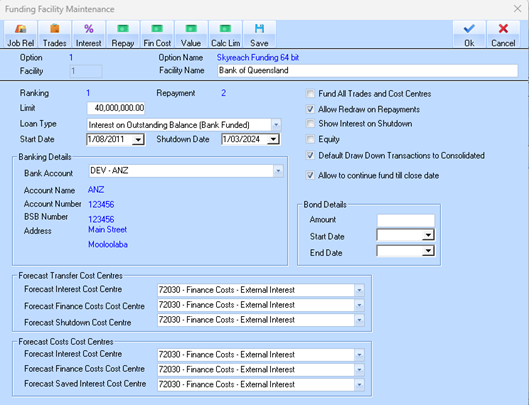
1. Select an Option.
2. Go to Funding Facilities tab.
3. Click New or select existing.
4.
|
•Option: The sequential number for this funding option. Useful if multiple options exist for one facility.
•Option Name: Descriptive name of the funding option
•Facility: Identifier for the funding facility.
•Facility Name: The bank or institution providing the funding. Here: Bank of Queensland.
•Ranking: Priority or order of use if multiple funding facilities exist.
•Repayment: Order of repayment for this facility, if multiple facilities exist
•Limit: Maximum amount of funding available. Example: $40,000,000.00.
•Loan Type: Defines how interest is calculated:
o Interest on Outstanding Balance (Bank Funded) – interest accrues on the amount currently drawn, not the full limit.
•Start Date / Shutdown Date: Dates the facility starts and ends.
Banking Details
•Bank Account: The bank used for this facility (drop-down list of existing accounts). Example: DEV – ANZ.
•Account Name / Number / BSB Number / Address: Standard bank account details needed for payments.
•These ensure that funds are drawn or repaid from the correct account.
Checkbox Options
•Fund All Trades and Cost Centres: Automatically fund all trades and associated cost centres.
•Allow Redraw on Repayments: Allows you to redraw funds once repayments are made.
•Show Interest on Shutdown: Display interest accumulated up to the shutdown date.
•Equity: Marks this facility as equity rather than debt.
•Default Draw Down Transactions to Consolidated: Combine draw-downs into a single transaction by default.
•Allow to continue fund till close date: Permits funding activity up to the closure date of the facility.
Bond Details
•Amount, Start Date, End Date: For any bonds attached to this facility (e.g., performance bonds), define value and duration.
Forecast Transfer Cost Centres
These map financial transactions from the funding facility to cost centres for forecasting purposes:
•Forecast Interest Cost Centre: Where forecasted interest expenses are posted.
•Forecast Finance Costs Cost Centre: For forecasted financing costs.
•Forecast Shutdown Cost Centre: Costs associated with shutting down or closing the facility.
Forecast Costs Cost Centres
These are similar to the above but for actual costs rather than forecasts:
•Forecast Interest Cost Centre
•Forecast Finance Costs Cost Centre
•Forecast Saved Interest Cost Centre: Tracks interest savings if, for example, early repayments reduce interest charges.
Essentially, this window configures a bank or funding facility: how much is available, repayment methods, linked accounts, and how forecasted and actual costs are tracked in the system.
5. Save.