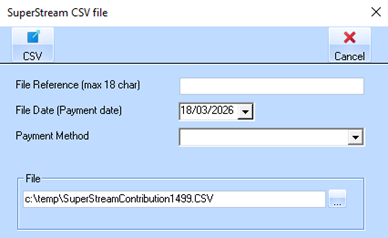
Once the STP process is complete, a new window will appear to enable the user to enter the SAFF file parameters and required file name as shown
|
Item |
Explanation |
|
File Reference (Max 18 Characters) |
•A unique identifier for this SuperStream file. •Can include letters, numbers, or a combination of both. •Purpose: Helps track or reference the file for your records or within the super clearing house. •Required: Yes – must be 18 characters or fewer. •Example: PAYRUN1499 or SUPER0326 |
|
File Date (Payment Date) |
•The date the super payment will be made in the Clearing House. •Automatically used to record the contribution period in the file. •Required: Select the correct date. •Example: 18/03/2026 |
|
Payment Method |
•Dropdown to choose how the super payment will be sent. •Options include: o BPAY o Direct Credit o Direct Debit •Required: Select the method that matches the payment process with your Clearing House. |
|
File |
•Specify the path and name of the CSV file to be generated for submission. •Required: Must provide a valid path and file name. •Example: C:\temp\SuperStreamContribution1499.CSV •Note: File path is set in your Payroll Default Settings. •This is the file you submit to the superannuation clearing house. |
|
CSV Generation |
•After entering all parameters and details, click the CSV button to generate the file. •Based on the finalized Pay Run data, the SAFF CSV file containing superannuation contribution details is created. •Purpose: o Formatted for submission to superannuation clearing houses. o Ensures accurate reporting of employee super contributions for the pay period. |
|
ℹ️ |
Users should consult with their specific superannuation clearing house to confirm the correct details and requirements for the fields outlined above. While Zavanti can provide guidance and recommend a suitable clearing house if needed, we are not affiliated or aligned with any particular provider, and it is the employer’s responsibility to ensure all submissions meet the clearing house’s standards. |