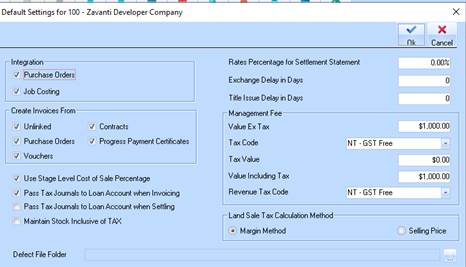
This allows you to define a set of defaults for sales input and maintenance, which saves you from having to repetitively enter common information. Most fields can be amended from within the Sales Input for sales that do not meet the default criteria.
The Sales Defaults options allow you to define flags and options that are to be used by default when creating new sales and also some defaults for Accounts Payable invoices.
1. Select a menu path of Maintenance Ø Defaults.
2. The following window will be displayed:
3. The Rates Percentage for Settlement Statement field is used for word processing functions within the software that enable you to write and print a Settlement Notice at the time your sale is settled by the client. In each case depending on where you operate your business there is a rates adjustment to be made. The calculation of this rate adjustment varies depending on location and year. This setting enables you to change the rates percentage that is input into that function.
4. The Exchange Delay in Days field is used by the Overdue Exchanges report to determine how long after the exchange date a sale in this estate will be deemed to be overdue. The value of this field will appear as the default in Estate Maintenance.
5. The Title Issue Delay in Days field is used by the Overdue Settlements report to determine how long after the title issued letter was sent to the client that the settlement is due to take place. If the sale has not settled this number of days after the title issued letter was sent then the sale will appear on the Overdue Settlements report. The value of this field will appear as the default in Estates Maintenance.
6. The Management Fee portion of the window allows you to look at settings specified at an Estate level and gets the value including and excluding tax of the management fee (you would need to work out this fee and enter here). The system will then raise a debit to the account selected in the Management
7. Fee Debit Account set up on the estate maintenance window also and a credit to the credit account. In reality the Credit account would be a sales account and the debit account would be a loan to the company in which the estate which contains the land resides.
8. The Land Sale Tax Calculation Method radio button selections allow you to set whether you wish to calculate the tax content of a sale using the gross margin method or the selling price.