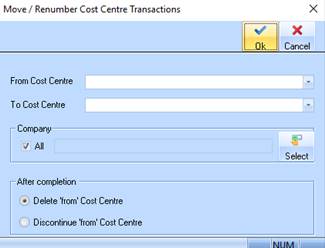
A new window is provided "Move / Renumber Cost Centre Transactions" that is called from the new menu option.
This window will allow the user to select a 'from' and 'to' Cost Centre and the Company(s) they wish to apply the Move / Renumber of Cost Centres
•From Cost Centre - This drop down list provided will show a list of ALL Cost Centres for the login company. The user is able to select 1 Cost Centre from the list provided
•To Cost Centre - This drop down list provided will show a list of ALL Cost Centres for the login company. The user is able to select 1 Cost Centre from the list provided
•Company - The standard company selection criteria is provided to enable to select, ALL, one or many companies in which they want the process of 'Move / Renumber' of Cost Centres to occur.
•Radio buttons
o Discontinue 'from' Cost Centre on completion
o Delete 'from' Cost Centre on completion
The user will select one of these options that will perform the required function on completion of the process
Once the user has selected the from and to Cost Centre and the companies required, they can then click the 'OK' button to process the 'Move/Renumber' of the selected Cost Centre
When the user clicks the 'OK' button the following will occur:
The process will check that the 'to' Cost Centre exists in ALL selected company(s). If not, then a message is displayed and the process will terminate.
|
"The 'to' Cost Centre 'yyyyyyy' does not exist in all selected company(s). You are UNABLE to continue this process" |
The process will check that the 'to' Cost Centre DOES not exists in selected tables for the selected company(s). If it does, then a message is displayed and the process will terminate.
|
"The 'to' Cost Centre 'yyyyyyy' is being used in the 'aaaaaaa' settings and cannot be renumbered. Please amend the 'aaaaaaaa' and retry. You are UNABLE to continue this process. Note where 'aaaaaaa' is Detail from table below |
The data tables are checked and message displayed if the Cost Centre exists. The user must then manually fix the offending data before trying again.
A message is displayed to confirm that the user has made the correct selections prior to processing.
|
"You are about to move/renumber all transactions from Cost Centre 'xxxxxx' to Cost Centre 'yyyyyyy' for selected company(s). You are UNABLE to reverse this process" Are you sure you wish to continue Y/N?? |
When the user click OK then continue the process processing will commence and update each table as required by updating the 'FROM' Cost Centre to the selected 'to' Cost Centre.
A message is displayed in the Status Bar of the Move/Renumber Cost Centre Transactions window (See: Fig 2)
|
'Updating the xxxxxxxx table' |
The 'FROM' Cost Centre is updated to the 'NEW' Cost Centre for each of the columns (field) names and tables names provided
•Once the renumber process is complete, the 'from' Cost Centre is deleted or discontinued based on the radio button settings at commencement of the renumbering process
o Discontinue 'from' Cost Centre on completion
o Delete 'from' Cost Centre on completion.
•A message is displayed in the Status Bar of the Move/Renumber Cost Centre Transactions window.
|
'Deleting (or Discontinuing) the 'From' Cost Centre' |
•A message is displayed on completion of the process
|
"All transactions have been renumbered from Cost Centre 'xxxxxx' to Cost Centre 'yyyyyyy' for selected company(s). Cost Centre 'xxxxxx' has been deleted(or discontinued)" |