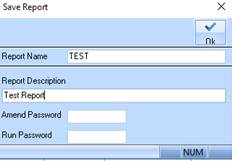
1. Once Details and Balances have been entered press the Save button. The following dialogue box will be displayed:
2. Enter a title for your report into the Report Name field. There is a constraint in the naming convention which means that you cannot include spaces and are limited to 12 characters. Press Tab.
3. Specify a meaningful term into the Report Description field to explain the purpose of the report.
4. If you would like to apply security settings to the report, you can specify a password both to amend the report (by entering a password into the Amend Password field) and to execute the report (by entering a password into the Run Password field).
5. Press the OK button.