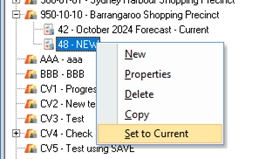
1. If you maintain multiple Forecasts for the same Job, you can only maintain set one Forecast to ‘current’. You can set any Forecast to ‘Current’ by using the right mouse click menu option ‘set to current’
2. Click the ‘Set to Current option.
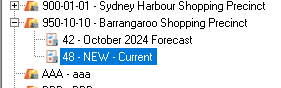
3. The selected Forecast will be set as ‘Current’ thus replacing the previous Forecast as set. This option will not change any other values in the previous ‘current Forecast’
|
Note |
The ‘Current’ Forecast is used by the Power Writer and Job Summary windows to show the Forecast Values. This allows the user to set up multiple Forecast ‘scenarios and switch between several versions of the Forecast to produce comparison reports Alternatively, users can save previous forecast to refer to previous months (years) if required.
|