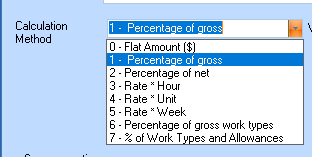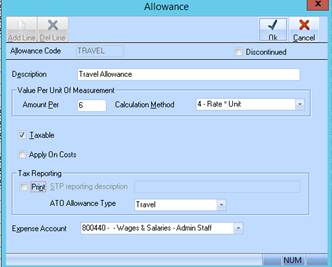
Allowances will be reported for ATO reporting on the basis of the combination of selections when setting up your allowances. These selections cannot be changed once the Allowance has been created.
The selection options are:
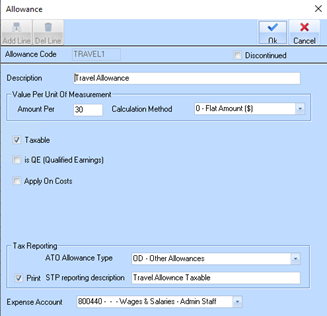
•Taxable – do not Print for Tax Reporting
o Allowance will be added to employee’s gross pay in STP file
•Taxable – Print for Tax Reporting
o Allowance will be shown under allowances in the STP file
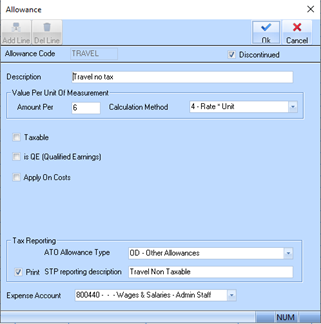
•Non-taxable - Print for Tax Reporting
o Allowance will be shown under allowances in the STP file, but no tax withheld
•Non-Taxable – do not Print for Tax Reporting
o Allowance is not included in any report
Examples of these options are shown in the screen shots below.
•Taxable – do not show report as allowance for Single Touch Payroll, the amount is included in the employee’s ordinary earnings.
•
 |
•Non-taxable - show as an allowance in your Single Touch Payroll report, but no tax withheld
 |
•Non-Taxable – do not show on Single Touch Payroll report
•Confirm that all Allowance items are correctly flagged as ‘QE’ in accordance with the ATO requirements.
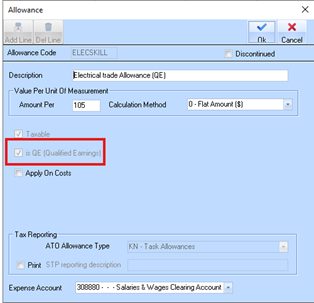
|
ℹ️ |
Please note that if your Allowance type(s) is incorrectly flagged as ‘QE’ and the field is ‘disabled’ you may need to create a new allowance to replace it and then apply that work type to all your existing employee timesheet records where applicable. |
1. Confirm that all non-QE Allowance items are NOT flagged as ‘QE’ in accordance with the ATO requirements
2. Allowances flagged as QE are now included in the calculation of Contributions set to Option 1 – Percentage of Gross. Previously, this calculation only included Work Types, but it now incorporates both QE-flagged Work Types and Allowances to provide a more accurate gross earnings base for calculation of Super Liability.