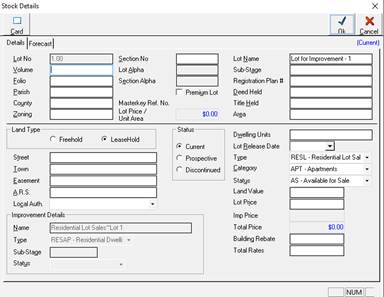
The import process creates all the stock in the Development Ledger as ‘Prospective’. This is because the actual Stock details may not be finalised, and therefore we don’t want the Development Ledger and associated reports to reflect stock that may not yet be ‘Current’. Therefore, the user must update each stock item individually in the Development ledger as follows
Update the LOTS, by selecting the Stage maintenance for the appropriate Stage. There you can see each lot as ‘prospective’ (shown in Blue) (Eg. Table view)
1. Select each LOT and go to PROPERTIES, and click the ‘DETAILS’ button
2. The Stock Detail screen will be displayed
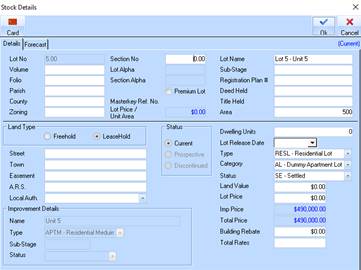
3. Set the ‘Status’ to ‘Current’
4. Set the ‘Type’, ‘Category’ and ‘Status’ to the required option, if different to that specified in the import process (see Step 2 -5)
5. Set the ‘Lot Name’ if required
6. If this a LAND only project, enter the ‘Land Value’ in accordance with the Gross Margin Scheme if applicable. If the project relates to Improvements (apartments, units etc) then this is to be maintained at the Improvement level (see Step 3 – 2)
7. Click ‘OK’ to save
8. Update the IMPROVEMENTS, by selecting the Project maintenance for the appropriate Project. There you can see each improvement as ‘prospective’ (Eg. Table view)
9. Select each IMPROVEMENT and go to PROPERTIES
10. The Improvement maintenance window will be displayed
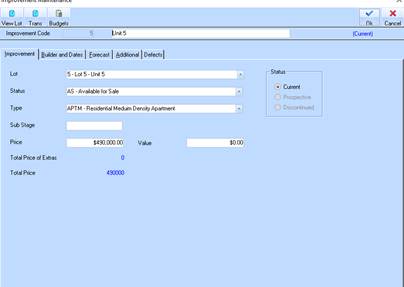
11. Set the ‘Status’ to ‘Current’
12. Set the ‘Type’ and ‘Status’ to the required option, if different to that specified in the import process (see Step 2 -5)
13. Enter the ‘Land Value’ in accordance with the Gross Margin Scheme if applicable.
14. Click ‘OK’ to save