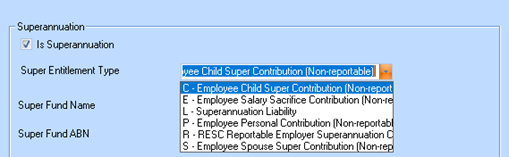
Several options have been added to the ‘Superannuation Entitlement Type’ selections to comply with both the ATO and Super Stream reporting requirements
These contribution types are available for selection when the ‘Is Superannuation’ checkbox is enabled within the contribution configuration. All selected contribution types flagged as ‘Is Superannuation’ are included in the Super Stream SAFF file and are mapped to their appropriate fields in accordance with SuperStream reporting requirements.
Ensure that any non-super contributions have the ‘Is Superannuation’ checkbox unchecked, so that only contribution types flagged as superannuation will be included in the SuperStream SAFF file and mapped to the required reporting fields.
The table below shows all current and new Super Entitlement Type settings and how they are used in STP Reporting
|
Super Entitlement Type |
Use |
STP Reportable |
|
E - Employee Salary Sacrifice Contribution |
To be used for Salary Sacrificed Super contributions, where the amount reduces the employee’s taxable income |
N |
|
R - RESC Reportable Employer Superannuation Contribution |
Any additional employer contributions above the super guaranteed rate. These are employer-paid contributions. |
Y |
|
C - Employee Child Super Contribution |
Used where an Employee contributes to a Childs Super Fund. These are voluntary contributions made from the employee’s net (after-tax) pay as a deduction |
N |
|
L - Superannuation Liability |
Employer 12% (currently) contributions super guaranteed rate. This is the employer obligation. |
Y |
|
P - Employee Personal Contribution |
Any additional employer contributions NOT Salary Sacrifice. These are additional voluntary contributions made from after-tax income deductions |
N |
|
S - Employee Spouse Super Contribution |
Used where an Employee contributes to a Spouses Super Fund. These are additional voluntary contributions made from after-tax income deductions |
N |
|
ℹ️ |
Ensure that ALL Super Salary Sacrifice Contributions are flagged as ‘E’ Employee Super Sacrifice prior to STP submissions (after 1 Jul 2026) so that they are NOT reported. You may need to create a new Contributions to replace existing and amend employee timesheet records where applicable. Please also refer to ATO Guidelines on Super Entitlement Type settings for all other Super Contributions to ensure your details are set correctly. |
Example – Employee Spouse Super Contribution (After-Tax Deduction)
An employee has the following pay details for a pay period:
•Gross Earnings: $17300
•PAYG Tax: $ 7751.25
•Net Pay (before deductions): $9548.75
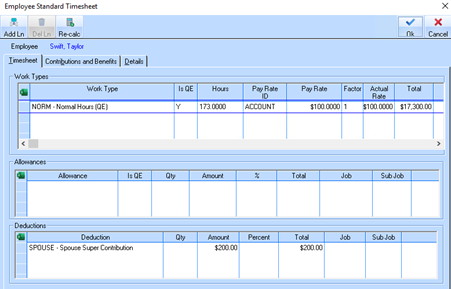
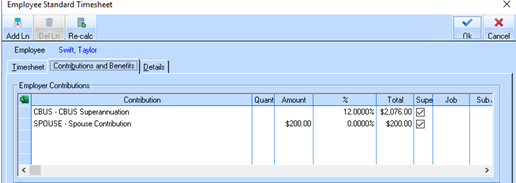
The employee elects to make a personal super contribution of $200 to Spouse’s Superannuation (after-tax).
Sample timesheet showing deduction
And contribution to Spouse Super Fund
Deduction Applied:
•Employee Personal Super Contribution: $200 (after-tax deduction)
Final Net Pay:
•$9548.75 – $200 = $9348.75
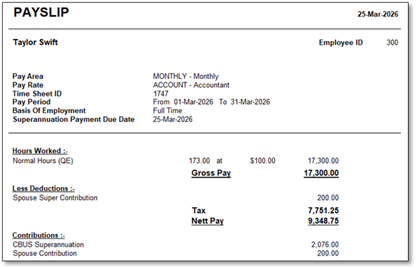
Sample Payslip showing after Tax Deduction and additional Spouse contribution
Outcome:
•The $200 is deducted from the employee’s (after-tax) pay
•It is paid to the employee’s nominated super fund
|
Key Point |
Personal super contributions are post-tax deductions |