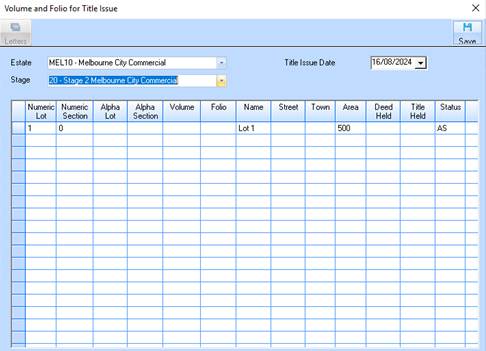
The assign volume and folio function allows you to change the basic information of a lot. When you get allocated the title to a group of lots in a stage you will need to set the Volume and Folio information on each lot. As well as making the changes to the group of lots you may need to send a letter to all those clients who have entered into a contract to purchase one of the lots from you advising them that the title is now ready and they need to settle in a certain number of days.
The Letter button on this window allows you to choose a predefined letter and send that letter to each purchaser. This letter would have parameters set up to update the notified date on the sales contract. Therefore when you send the letters you update the notified date, and then the Overdue Exchanges report will work out whether the clients have exchanged contracts now the title is valid.
1. Select a menu path of Transactions Ø Volume and Folio for Title Issue.
2. The following window will be displayed:
3.
Select a value from the Estate pick list by pressing the dropdown arrow  .
Press Tab.
.
Press Tab.
4. Select a value from the Stage pick list. The data table will now be populated with the available Lots under the Estate and Stage.
5. Select a line item that you would like to amend the details of. Position your cursor in the Status field and change the value to ‘2’. The Letter Button will now be enabled.
6. Press the Letter button.
7. Select a letter from the list and press the OK button.
8. This window allows you to enter specific data into fields that will be populated into your letter. Leave the value as defaulted and press the OK button. The completed letter will be displayed in the word processing interface as defined via the Maintenance function.