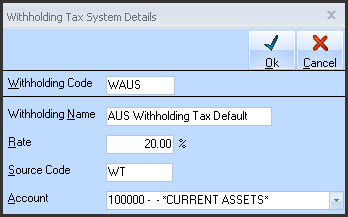
If you have had warning of ‘no Withholding Tax codes’, the Withholding Tax code dialog will automatically display with the appropriate Tax code and Description, ready for input of the Rate and GL account. (See below). The Code and Description will be greyed out as they are fixed.
Maintenance of Withholding Rate of GL code is achieved by right click any ‘Withholding Code’ combo box on the AP or JC screens.
There must be 3 Withholding Tax Codes setup for UK processing.
The 3 ‘Codes’ must be:
•‘WAUS’ for Lower Tax Rate processing (currently 20% but this is not fixed)
•‘WTAUSO’ for Higher Rate processing (currently 30% but this is not fixed)
•‘WTAUSE’ for exempt processing (should be set to 0%)
Enter the Rate and appropriate GL account that this deduction is to be posted to. The Code and Description will already be displayed as they are fixed.