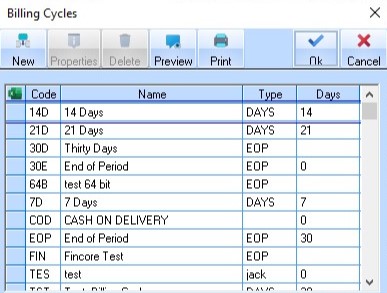
A user may create new values in a Code List by selecting the Maintenance menu and selecting the Code List name that requires modification.
To create a new entry in a code list,
1. Select a Menu path of Maintenance Ø Billing Cycles. A dialogue box similar to the following will be displayed:
2. Select the New icon. The following window will be displayed:
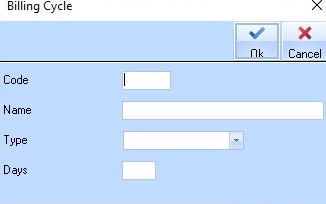
3. Enter a three character value into the Code field and press the Tab key.
|
|
When specifying Codes, always try to be as logical in naming standards as possible. It should be easy to interpret its definition for example; Payment Terms of 14 days is recognised easily using a code of 14D. |
4. Enter a description of the Code into the Name field. Press the Tab key.
5. Select a Type from
the pick list by selecting the  button. Press the Tab key.
6. Specify the number of days for the Payment Cycle into the Days field.
7. Press the OK button. The new Code will be displayed with an arrow to its left:
