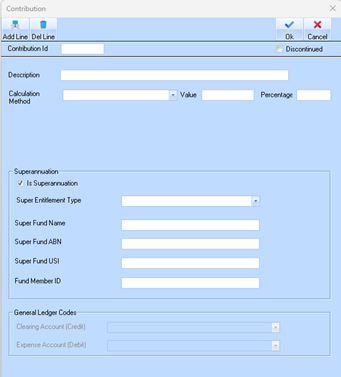
Explanation of fields – Contribution
The contributions option of the maintenance menu is for entering details of superannuation payments that are made by the employer on behalf of the employees.
1. In the Payroll module, click Maintenance > Contributions.
2. Click New to set up the new Contribution. The following window will appear, enter the appropriate information as described below:
3. When completed press the OK button. The refreshed Contributions window will be displayed
Explanation of fields – Contribution
|
Name |
Description |
|
Contribution Id |
Assign the code a unique identifier. |
|
Description |
Enter a name for the code. |
|
Discontinued |
Use this checkbox if the existing code is to be no longer used. |
|
Calculation Method |
Used to instruct the system how to calculate the amount of the contribution. For example, select a value of “Percentage of Gross”. Position your cursor in the Percentage field. Based on your selection from the Calculation Method pick list, the Percentage field is used to enter the percentage figure to calculate. For the purposes of this exercise, enter a value of “9”. |
|
Percentage |
Enter a figure of -100 (negative 100). Whatever value is applied to the employee for their sacrifice will be automatically applied to this contribution. As a work type, a salary sacrifice is already a negative in gross earnings. The contribution needs to be a positive, so a negative figure (work type) combined with a negative percentage figure will result in a positive contribution. |
|
Work Type |
This option allows the contribution to be set to particular work types only i.e. no other work types paid to the employee will be affected by the contribution, other than those selected in this window. Press Add Line and select the work type created in section 0 |
|
Super Fund Name |
Legal name of the complying super fund. |
|
Super Fund ABN |
Australian Business Number of the super fund. |
|
Super Fund USI |
Unique Superannuation Identifier required for APRA-regulated funds to identify the specific product |
|
Fund Member ID |
Member Account Number of the employee’s specific account identifier.
|
|
Clearing Account (Credit) |
This list is used to nominate the credited account in the General Ledger module. Select an account from the list by pressing the dropdown arrow. Payments to the Fund will be made from this account when processing the payment via the general ledger |
|
Expense Account (Debit) |
Used to nominate the expense account in the General Ledger. Select an account using the drop down menu |